
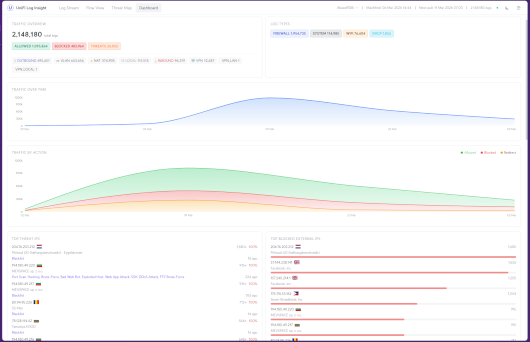
Real-time UniFi Network Monitoring, Syslog Analytics & Threat Intelligence
UniFi Insights Plus is a powerful, self-hosted network monitoring and security analytics solution designed for UniFi gateways and routers.
This QNAP edition runs natively on QTS 6 and QuTS hero 6, without Docker, combining a Python-based Syslog receiver, PostgreSQL database and a modern React web dashboard.
Key Features
- Live Syslog Monitoring: Real-time firewall, DHCP, Wi-Fi, DNS and system event analysis.
- Interactive Dashboard: Network statistics, traffic trends, blocked connections and device activity.
- Threat Intelligence: IP reputation and security scoring through AbuseIPDB.
- GeoIP & ASN: Geographic location, ISP identification and reverse DNS enrichment using MaxMind GeoLite2.
- Threat Map: Interactive visualization of network threats.
- Network Flow Analysis: Sankey diagrams, traffic direction detection and VLAN visibility.
- UniFi Integration: Automatic network discovery, device identification and firewall Syslog management.
- Multi-WAN & VPN: Support for multiple WAN interfaces and VPN connections.
- Data Management: Configurable log retention, CSV export and configuration backup.
- Responsive Interface: Modern dashboard with light and dark themes.
- Persistent Storage: PostgreSQL data and user configuration are preserved during package upgrades.
Compatibility & Requirements
Supported systems: QTS 6 / QuTS hero 6
Architectures: x86_64 and ARM64 (aarch64)
Required QPKG dependencies:
- Apache85 — Python 3.12 runtime
- PostgreSQL17 — Database engine
Recommended hardware: 4 CPU threads, 4 GB RAM and at least 10 GB of available storage. Actual requirements depend on Syslog traffic and retention settings.
Docker and Container Station are not required.
Network Ports
- 8090/TCP: Web dashboard and REST API
- 514/UDP: UniFi Syslog receiver
- 55432/TCP: Private PostgreSQL instance (localhost only)
Web and Syslog ports are configurable.
Quick Start
1. Install dependencies
Install and enable Apache85 and PostgreSQL17 before installing UniFi Insights Plus.
2. Install and start UniFi Insights Plus
Install the QPKG through QNAP App Center.
The application initializes its private PostgreSQL database and creates its configuration automatically on the first successful startup.
3. Access the dashboard
Open your browser and navigate to:
http://YOUR-NAS-IP:8090
Follow the setup wizard to connect your UniFi controller using a UniFi OS API key or supported controller credentials.
4. Configure UniFi Syslog forwarding
In UniFi Network 10.x:
Navigate to Settings → Integrations → Syslog.
- Enable Activity Logging.
- Select SIEM Server.
- Enter your QNAP NAS IP address.
- Set the destination port to 514 UDP.
- Enable Firewall Default Policy logging and other desired event categories.
Save the configuration.
On older UniFi Network versions, configure remote Syslog forwarding through the corresponding system logging settings.
5. Configure optional integrations
For enhanced analytics, configure:
- MaxMind GeoLite2 account and license key for GeoIP/ASN database updates.
- AbuseIPDB API key for IP reputation and threat scoring.
- UniFi API access for automatic device and interface discovery.
Service Management
Start:
/etc/init.d/Unifi-insight-plus.sh start
Stop:
/etc/init.d/Unifi-insight-plus.sh stop
Restart:
/etc/init.d/Unifi-insight-plus.sh restart
Check status:
/opt/Unifi-insight-plus/status.sh
Health check:
/opt/Unifi-insight-plus/healthcheck.sh
Configuration & Logs
Installation directory:
/opt/Unifi-insight-plus
Configuration:
/opt/Unifi-insight-plus/config/unifi-insights-plus.env
PostgreSQL data:
/opt/Unifi-insight-plus/data/postgresql
Logs:
/opt/Unifi-insight-plus/logs
Existing configuration files and PostgreSQL databases are preserved during package updates. Backups are recommended before major upgrades.
Security Notes
The dashboard uses HTTP by default. Keep access restricted to trusted networks or provide HTTPS through a properly configured reverse proxy.
PostgreSQL is restricted to localhost and does not expose its database port to the network.
Project Information
Original developer: jmasarweh
GitHub: https://github.com/jmasarweh/UniFi-Insights-Plus
Documentation: https://insightsplus.dev/docs
License: Business Source License 1.1 (BSL 1.1)
QNAP integration: Community native QPKG adaptation, not an official QNAP or Ubiquiti package.