
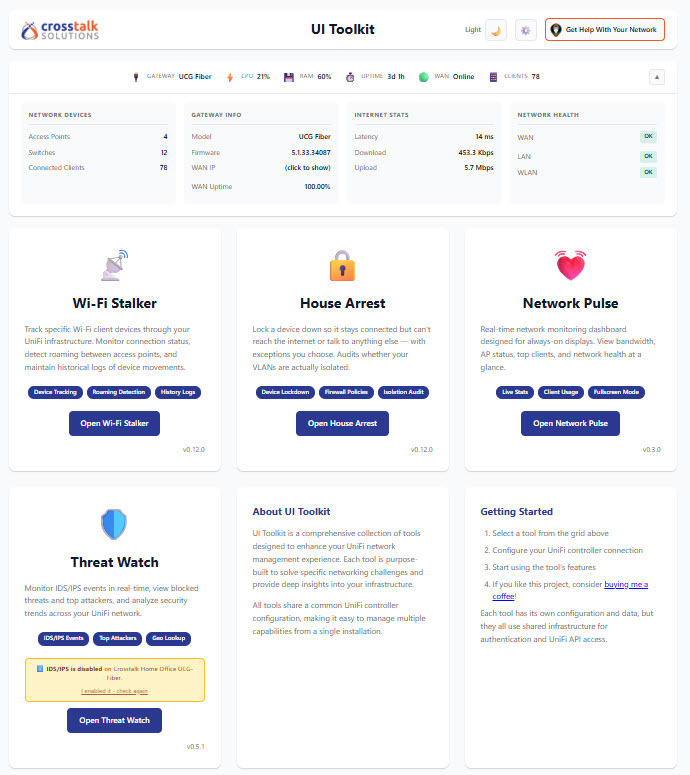
UniFi Toolkit by Crosstalk Solutions is an open-source network monitoring and management suite for Ubiquiti UniFi environments.
This native QNAP edition runs directly on your NAS using Python from Apache85, without Docker, Container Station, or additional services.
Main Features
- Dashboard: Real-time gateway status, CPU, memory, WAN connections, VPN status, and connected clients.
- Network Pulse: Live network statistics, access point monitoring, and bandwidth visualization.
- Wi-Fi Stalker: Track wired and wireless clients, roaming history, signal strength, and device activity.
- Threat Watch: Monitor IDS/IPS security events, analyze threats, and configure webhook notifications.
- House Arrest: Isolate devices, restrict Internet access, and manage network firewall policies.
- Security: HTTPS access, password-protected administration, encrypted credentials, and SQLite database storage.
Compatibility & Requirements
- QTS 5 / QuTS hero 5 or newer
- x86_64 and ARM64 (aarch64)
- Required QPKG dependency: Apache85 only
- Python runtime provided by Apache85
- UniFi OS console (UDM, UCG, Cloud Key Gen2+, etc.)
- UniFi Network 9.0+ required for House Arrest firewall features
No Docker or FFmpeg required.
Web Interface
After installation, open:
https://YOUR-NAS-IP:17889
HTTPS is enabled by default. Your browser may display a certificate warning because the initial certificate is self-signed.
IMPORTANT – Default Username and Password
Default username: admin
The administrator password is generated randomly during the first startup.
Method 1 – QTS Event Log (Recommended)
- Log in to your QNAP NAS administration interface.
- Open QuLog Center.
- Navigate to Local Device → Event Log.
- Search for UniFi Toolkit.
- Locate the event containing the administrator username and generated password.
The credentials are recorded automatically in the QTS Event Log after the first successful startup.
Method 2 – SSH Access
If the event is unavailable, connect to your NAS via SSH and execute:
cat /opt/Unifi-ToolKit/etc/initial-password.txt
This file contains the administrator username and password.
Forgot Your Password?
Connect via SSH and execute:
/opt/Unifi-ToolKit/reset-password.sh
A new random password will be generated and recorded in the QTS Event Log. The local password file will also be updated.
Security note: Passwords recorded in QTS events are visible to authorized log viewers. Change your password after the initial login and protect access to NAS logs.
Updates & Persistent Configuration
Application updates preserve your existing configuration, UniFi controller settings, encryption keys, SSL certificates, and SQLite database.
Built-in service management scripts provide start, stop, restart, status, and password reset operations.
Installation directory: /opt/Unifi-ToolKit
Default HTTPS port: 17889
Source code: https://github.com/Crosstalk-Solutions/unifi-toolkit
Original project: Crosstalk Solutions
Last update: 15 October 2026