
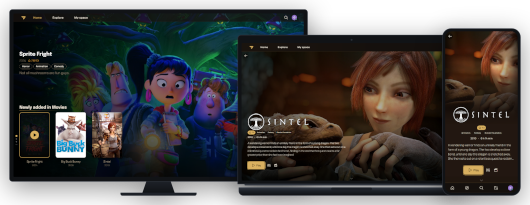
K7 is a native QNAP package for running the K7 media server directly on QTS 6 / QuTS hero 6 systems without Docker.
The package integrates K7 with a dedicated PostgreSQL database, the .NET 10 runtime and QNAP-optimized multimedia components. It is designed to keep application data, configuration, logs, database files and runtime state inside its own installation directory.
A lightweight Go-based startup gateway provides immediate access to a graphical status page while K7 and PostgreSQL are initializing. Once K7 is ready, the same public URL automatically becomes a transparent reverse proxy to the K7 web interface.
Main Features
- Native K7 deployment for QNAP NAS
- No Docker or container runtime required
- Dedicated PostgreSQL 17 database
- .NET 10 runtime provided by QMultimedia-Q6
- FFmpeg integration through QMultimedia-Q6
- Automatic database initialization and migration
- Persistent application configuration and database
- Upgrade-safe configuration handling
- Automatic K7 setup-token detection
- Setup token reported to the QTS system log
- Dedicated startup and diagnostic interface
- Real-time startup progress
- Live startup logs with sensitive values automatically redacted
- Automatic K7 readiness detection
- Transparent reverse proxy once K7 is ready
- Dedicated private backend port
- PostgreSQL accessible only through localhost
- English interface by default
- 20 selectable interface languages
- K7 branding with “by QoolBox”
- Direct link to the official K7 GitHub source repository
- QTS-compatible start, stop and status scripts
- x86_64 and ARM64 support
- All runtime data kept under
/opt/K7-Q6
Network Architecture
Public K7 access:
http://NAS-IP:27777
Internal services:
- K7 public gateway:
0.0.0.0:27777 - K7 application backend:
127.0.0.1:27779 - PostgreSQL 17:
127.0.0.1:27778
Only port 27777 needs to be accessed by users.
The K7 backend and PostgreSQL database are intentionally bound to localhost and are not directly exposed to the network.
Required Dependencies
The following QPKGs must be installed before starting K7:
QMultimedia-Q6
Required for:
- .NET 10 runtime
- FFmpeg
- multimedia libraries
- supporting runtime libraries
Expected installation path:
/opt/QMultimedia-Q6
.NET runtime:
/opt/QMultimedia-Q6/dotnet10
FFmpeg:
/opt/QMultimedia-Q6/bin/ffmpeg
PostgreSQL17
Provides the PostgreSQL 17 database server used by K7.
Expected installation path:
/opt/PostgreSQL17
K7 uses its own dedicated PostgreSQL database and credentials.
Quick Start
- Install QMultimedia-Q6.
- Install PostgreSQL17.
- Install the K7 QPKG.
- Start K7 from the QNAP App Center.
- Open:
http://NAS-IP:27777
The startup interface appears immediately while PostgreSQL and K7 are being prepared.
When initialization is complete, the same URL automatically displays the K7 web interface.
For first-time setup, retrieve the K7 setup token from the QTS System Event Log.
Look for an entry containing:
K7_SETUP_TOKEN=...
The token is intentionally not displayed in the browser startup logs.
Startup Diagnostic Page
The startup and diagnostic interface remains available after K7 has started:
http://NAS-IP:27777/__bootstrap/
It provides information about:
- PostgreSQL status
- K7 backend status
- startup progression
- service readiness
- current ports
- recent startup logs
- system information
- detected K7 version
Sensitive information such as passwords, API keys, Bearer tokens and setup tokens is automatically filtered from browser-visible logs.
Application Data
K7 keeps its runtime data under:
/opt/K7-Q6
Important directories include configuration, secrets, database data, logs, runtime files and application data.
User configuration and database content are preserved during package upgrades whenever possible.
Security
The package uses separate secret files with restricted permissions instead of storing passwords directly in the main configuration file.
PostgreSQL is restricted to localhost.
The K7 application backend is also restricted to localhost and is exposed through the dedicated Go reverse proxy.
Sensitive values are removed from browser-visible logs.
Runtime library paths are isolated per application component to prevent PostgreSQL or multimedia libraries from interfering with QTS system commands.
Supported Architectures
- Intel / AMD 64-bit (
x86_64) - ARM 64-bit (
aarch64/ARM64)
Languages
The startup interface provides 20 selectable languages:
English, French, German, Spanish, Italian, Portuguese, Dutch, Korean, Japanese, Simplified Chinese, Traditional Chinese, Polish, Russian, Turkish, Arabic, Thai, Vietnamese, Indonesian, Hindi and Swedish.
English is used by default.
Source Project
K7 is based on the open-source project maintained by kaybi-gh:
https://github.com/kaybi-gh/K7
This QNAP package provides the native QTS/QuTS hero integration, startup management, PostgreSQL integration, runtime isolation and QNAP-specific deployment environment.
Package integration by QoolBox.