
Clears your inbox, sends emails, manages your calendar, checks you in for flights.
All from WhatsApp, Telegram, or any chat app you already use.
openclaw command line in $PATH
Web management will openclaw update integrate
A complete web-based setup and management interface for OpenClaw on QNAP NAS devices.
No SSH required. Runs on port 5655
🌍 Full Multilingual Interface (11 languages)
Complete translation of every panel, button, hint, banner, and dynamic message.
Language is saved automatically and restored on next visit.
Supported: English · Français · Deutsch · Español · Italiano · Português · 中文 · 日本語 · 한국어 · العربية · Русский
RTL layout for Arabic. Language selector in the top bar.
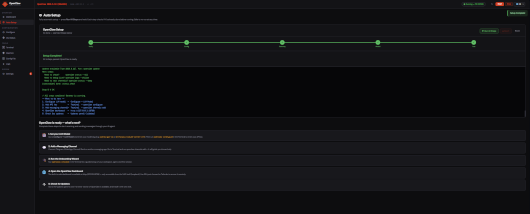
🧙 Auto Setup Wizard
One-click 5-step automated setup:
Verify — checks the OpenClaw installation
Config — initialises gateway.mode=local and generates the auth token
Gateway — starts the gateway, kills any conflicting process first
Model — detects the configured LLM model
Test — end-to-end crestodian check
Each step is idempotent — safe to re-run at any time
Skips steps already completed (token match, gateway healthy)
Wizard state is persisted across restarts (localStorage + server-side .configured flag)
“All done” view with Next Steps guide after completion
📊 Dashboard
4 stat cards: Gateway status · PID · Config · Gateway WS
4-state smart banner: Fresh install / Config missing / Gateway stopped / Running OK
Auto Setup ! badge on nav item when setup is not yet completed
Quick Commands — 8 one-click commands streamed live
Gateway health card with real-time WebSocket check
Auto-refreshes every 10 s
⚙️ Settings Panel (replaces separate Env + Updates nav items)
Five tabs in a single panel:
TabContentGeneralBind address, port, base path — saved to ui-settings.json (0600)SecurityEnable/disable login, username + password (SHA-256 salted)LanguageFull language selectorUpdatesVersion check, Install Update button with live progress barEnvironmentDetected paths, node version, OS, arch
⬆️ Live Update Engine
Real-time streaming via Server-Sent Events — output appears immediately, no frozen screen
Animated progress bar that always moves (slow creep during silent download phase)
4-step flow: openclaw update → restart gateway → fix symlinks → verify
Automatically updates qpkg.conf Version + Build via /sbin/setcfg (QNAP AppCenter reflects new version)
Fixes /usr/bin/openclaw and /opt/OpenClaw symlinks post-update
Update badge auto-checks 3 s after page load
🔧 Configuration Panel
Gateway Auth Token — display, copy, regenerate
Config Keys — preset chips + free-form set/get
Doctor — openclaw doctor with –fix auto-repair
LLM Model — status + set model
Channels — status display + shortcut to Terminal
🖥️ Terminal
Live streaming WebSocket terminal for any openclaw command
Interactive stdin support (for channels add, onboard, etc.)
Quick-command chips
👾 Daemon Panel
Gateway process status (PID, uptime)
Start / Restart / Stop / Kill / Clean Start (kills orphan port 18789 processes)
Extra args for openclaw gateway run
Live gateway log tail with Auto mode
📄 Other Panels
OC Status — full openclaw status output with –deep toggle
Config File — JSON editor with format, save, reload, copy
Logs — live tail, 100–5000 lines, Export TXT/CSV, Auto-refresh
Security
HTTP Basic Auth (optional, enabled via Settings → Security)
subtle.ConstantTimeCompare for timing-safe password verification
SHA-256 salted password hashing
Command injection protection via allowlist (27 permitted commands)
Path traversal protection on all file endpoints
Request body size limit (1 MB)
WebSocket origin check
Config files written with 0600 permissions
Full security headers: CSP, X-Frame-Options, X-Content-Type-Options, Referrer-Policy, Permissions-Policy
All server timeouts set (ReadHeader, Write, Idle)
Zero third-party Go dependencies (stdlib only)
Technical
Binary: single statically-linked Go binary (~2.4 MB), HTML/JS embedded
Port: 5655 (configurable)
Config: $QPKG_ROOT/TMPDIR/ui-settings.json
Logs: $QPKG_ROOT/TMPDIR/openclaw-setup-ui.log
Cache buster: build timestamp embedded, forces browser reload on binary update
BusyBox compatible: OpenClaw.sh uses only BusyBox ash constructs
QPKG_ROOT resolution: env var → /opt/OpenClaw symlink → filepath.EvalSymlinks
All openclaw child processes run with cmd.Dir = QPKG_ROOT (fixes Node.js uv_cwd crash)