Find duplicate files, reclaim storage space, inspect your NAS shares and manage cleanup tasks from a modern web interface powered by Czkawka.
PRESENTATION
QFileLens is a native storage analysis and cleanup application designed for QNAP NAS devices running QTS or QuTS hero. It brings the Czkawka analysis engine to an integrated, responsive web interface, helping you understand what occupies your storage, locate unwanted files and review potential cleanup actions.
QFileLens scans files directly on your NAS. The QNAP smb.conf file is read only to discover configured, eligible shared folders and resolve their local filesystem paths. It is not used as a network SMB client: no remote SMB connection is required, and users cannot select arbitrary system directories outside the permitted shares.
MAIN FEATURES
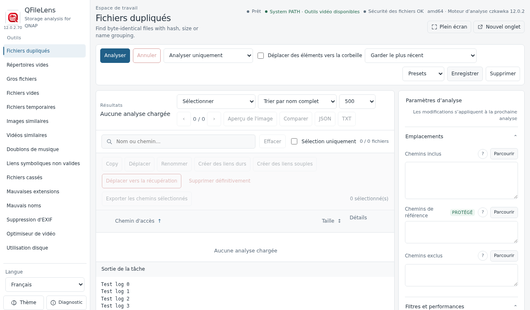
– Duplicate files: identify matching files using size and content hashing.
– Similar images and videos, plus duplicate music detection.
– Empty folders and files, large files and temporary files.
– Invalid symbolic links, broken files, problematic extensions and file names.
– EXIF metadata removal, video optimization and disk usage inspection.
– Shared-folder picker, reference and exclusion paths, filters, sorting and presets.
– Reviewable file actions: copy, move, rename, hard links, symbolic links and cleanup.
– Recovery-oriented controls, operation logs, diagnostics and result exports.
– Multilingual web interface, with light/dark appearance options.
QUICK START
1. Install and enable the QFileLens QPKG prepared for your NAS and firmware.
2. Launch QFileLens from the QTS / QuTS hero desktop or App Center.
3. Open the required analysis tool and click Browse under Included Paths.
4. Select an eligible NAS shared folder or one of its subfolders. Use the X on its label to remove a mistaken selection.
5. Click Scan / Analyser and review the results before selecting any file action.
6. For multimedia features, verify that FFmpeg/FFprobe is available; QMultimedia-Q6 is a supported optional source.
COMPATIBILITY & TECHNICAL INFORMATION
– Intended platforms: QNAP QTS and QuTS hero; NAS firmware compatibility must be checked on the target device.
– CPU targets: x86_64 (Intel/AMD), ARM64/aarch64 and ARMv7/armhf, where supported.
– Engine: Czkawka 12.0.2 (private native Rust executable).
– Web components: native Go server and QTS gateway, built for each CPU target.
– No Docker or container runtime required on the NAS.
– Optional multimedia integration: QMultimedia-Q6, Qffmpeg or another compatible FFmpeg/FFprobe installation; regular file analysis does not require FFmpeg.
– Application prefix: /opt/QFileLens (the actual QPKG installation location is managed by QTS).
IMPORTANT SAFETY NOTES
Begin with a read-only scan. Review every selected file and keep appropriate backups or snapshots before making changes, especially before permanent deletion or link replacement.
Access rights are determined by the NAS filesystem and its permissions. Some features depend on the installed FFmpeg/FFprobe tools and on the NAS firmware.
Last update: 11 November 2026