
Advanced Cron Task Manager
Cronarium is a modern, multilingual cron task manager for QNAP QTS and QuTS hero.
Create, schedule, monitor, and manage automated tasks through an intuitive web interface, with execution history, graphical scheduling insights, secure backups, and import/export capabilities.
Overview
Cronarium provides a powerful yet easy-to-use interface for managing scheduled tasks on QNAP NAS devices.
Designed as a native QTS desktop application, Cronarium combines traditional cron scheduling with advanced monitoring, graphical visualization, task management, and security features.
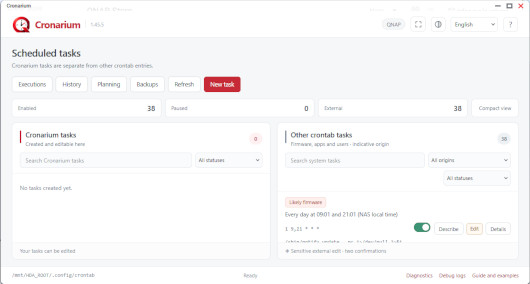
It distinguishes between user-created Cronarium tasks and existing QNAP system, firmware, and third-party application tasks, helping administrators manage automation without accidentally interfering with essential NAS operations.
The application is powered by a lightweight, statically compiled Go backend with an embedded web interface. No Docker container, external database, Node.js, or Python runtime is required.
Key Features
- Advanced Task Scheduling: Create, edit, enable, disable, and manage scheduled tasks using standard five-field cron expressions.
- Human-Readable Schedules: Automatically translate cron expressions into understandable descriptions, with the NAS timezone taken into account.
- QNAP System Task Discovery: Display existing firmware, QPKG, and user-defined cron entries separately from Cronarium-managed tasks.
- Custom Task Names: Assign meaningful names and descriptions to native QNAP tasks without modifying their original commands.
- Execution Monitoring: Track actual execution times, durations, shell exit codes, successful runs, failures, and interrupted or uncertain executions for monitored Cronarium tasks.
- Graphical Scheduling Overview: Explore upcoming scheduled starts using hourly activity charts, statistics, and simultaneous-start analysis. Identify individual tasks directly from the planning interface.
- Execution and Modification History: Separate actual task execution records from configuration-change history.
- Local Backups: Create private restoration points before modifying scheduled tasks, with controlled restoration that preserves current native QNAP entries.
- Task Export and Import: Export Cronarium-managed tasks to portable JSON files and import them on another installation, with preview, validation, and confirmation.
- Safe Service Lifecycle: Managed schedules are detached when Cronarium stops and restored when the service starts successfully, preserving unrelated QNAP cron entries.
- Script Validation: Check script paths, symbolic links, executable permissions, and interpreter availability without executing the command during validation.
- Security Controls: QTS administrator authentication, CSRF protection, atomic configuration updates, revision checking, protected storage, and rollback mechanisms.
- Multilingual Interface: 20 supported languages, responsive layouts, resizable dialogs, and light/dark themes.
- Native QTS Integration: Desktop-style interface through the QTS application proxy, with no additional Cronarium login required for an authenticated QTS administrator.
Backup and Data Protection
Cronarium provides separate mechanisms for local recovery and task migration.
Local Backups create restoration points of the NAS crontab. Restoration through Cronarium is limited to Cronarium-managed tasks and preserves the current native QNAP entries.
Export/Import allows administrators to save and transfer Cronarium task definitions using portable JSON files. Imported tasks are disabled by default to prevent unexpected execution.
Persistent settings, task definitions, histories, descriptions, and backups are stored under /opt/Cronarium/var.
upgrade-recovery routines designed to preserve application data when a package installation replaces the program directory.
Quick Start
1. Install Cronarium
Install the compatible Cronarium package using QNAP App Center or the manual installation feature.
2. Open the application
Launch Cronarium from the QTS desktop while logged in as a NAS administrator.
3. Create your first scheduled task
Click New Task, enter a task name, select a schedule, and provide the command or script to execute.
For example: 0 3 * * * /share/scripts/backup.sh
This schedules a backup script every day at 03:00, using the NAS timezone.
4. Monitor and manage
Use the Executions menu to review monitored task results, Planning to visualize scheduled activity, and Backups to create restoration points or export your tasks.
Why Choose Cronarium?
Cronarium brings modern scheduling, monitoring, and management capabilities to the QNAP environment without requiring containers or external services.
Whether you need to automate maintenance scripts, organize scheduled backups, monitor recurring commands, or understand existing QNAP cron entries, Cronarium provides a centralized and accessible management interface.
Security and Important Notes
Cronarium interacts with the NAS system crontab and therefore requires administrator privileges.
Native QNAP tasks are protected by additional warnings and confirmation procedures.
Modifying firmware-owned tasks may affect NAS functionality and should be performed only by experienced administrators.
Execution monitoring is available for Cronarium-managed tasks with tracking enabled. Existing native QNAP tasks are not automatically instrumented.
Scheduled starts occurring during the same minute do not necessarily indicate that commands overlap during execution.
Exported JSON files may contain complete shell commands, including sensitive arguments. Store them securely.
Last update: 29 October 2026