
CheckTmp — Intelligent /tmp Memory Management for QNAP NAS
Keep your QNAP NAS running smoothly with intelligent, automatic temporary storage management.
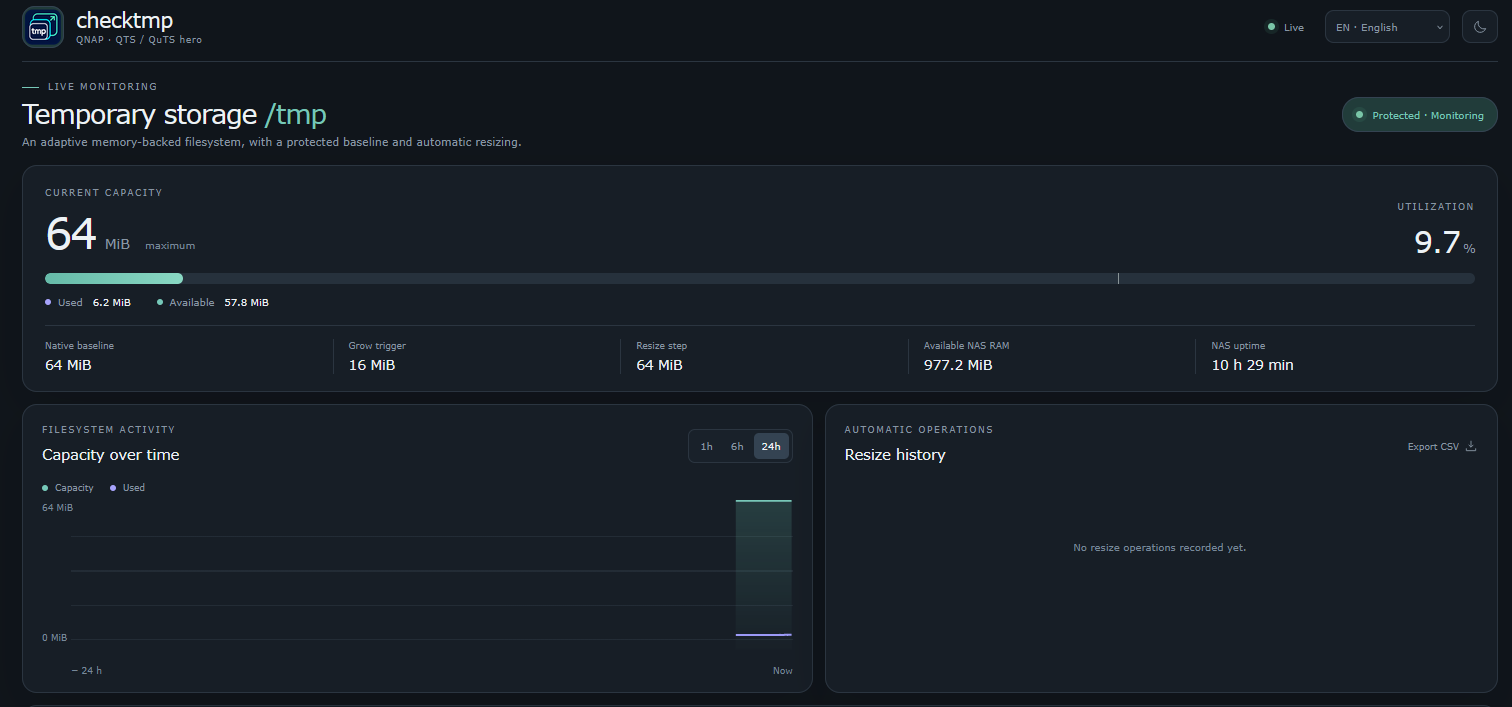
CheckTmp is a lightweight native utility developed by QoolBox for QNAP QTS and QuTS hero. It continuously monitors the /tmp temporary filesystem and automatically adjusts its capacity when additional space is required.
Rather than allowing a full temporary filesystem to disrupt running applications, CheckTmp dynamically expands available capacity and safely reduces it again when demand decreases.
Why Do You Need CheckTmp?
On QNAP NAS systems, /tmp is a memory-backed filesystem (tmpfs). Its initial capacity can be relatively small, even on systems with several gigabytes of RAM.
Applications and background services may temporarily consume significant space, potentially causing:
- Application failures and interrupted background tasks.
- Temporary file creation errors.
- Unexpected service instability.
- Problems during updates, installations or multimedia processing.
CheckTmp helps prevent these situations automatically, without requiring manual intervention.
Key Features
Intelligent Dynamic Resizing
Automatically expands /tmp when available space falls below a configurable threshold and progressively reduces capacity when demand decreases.
Original Capacity Protection
Records the native /tmp capacity and never intentionally reduces it below that baseline. When CheckTmp stops, it attempts to restore the original size, provided sufficient space remains for existing data.
Real-Time Web Dashboard
A modern, responsive interface featuring live capacity monitoring, usage graphs, NAS uptime, resize history and system memory information.
Advanced Storage Diagnostics
Identify large temporary files, directories consuming space, processes holding open file handles and deleted files that remain open. Historical diagnostics help investigate unusual storage consumption.
Native QNAP Integration
Runs directly on QTS and QuTS hero without Docker. Includes QPKG service integration, QTS event notifications and support for the QNAP web proxy.
Modern Multilingual Interface
Dark theme by default, optional light theme, refined graphics and 20 supported interface languages.
Safety and Security
CheckTmp is designed with NAS stability as its highest priority.
- Memory-aware limits: expansion is constrained by configurable capacity limits, physical RAM and available memory reserves.
- Non-destructive operation: existing
/tmpfiles are never intentionally deleted, and the filesystem is resized without unmounting it. - Safe shrinking: capacity is only reduced when sufficient free space can be preserved.
- Read-only dashboard: the web interface cannot delete files, terminate processes or manually force a filesystem resize.
- System event logging: capacity changes and important warnings are recorded in QNAP event logs.
- Security-conscious build: statically compiled Go binaries, without an external runtime dependency. The build process includes mandatory
govulncheckvulnerability analysis.
The dashboard is intentionally accessible without an application-specific password or token. Because diagnostic information may reveal system file paths and process names, access should be restricted to trusted networks, with appropriate QNAP firewall, proxy or VPN protections. Direct public Internet exposure is not recommended.
Compatibility and Requirements
- Platform: QNAP QTS / QuTS hero
- Architectures: ARMv5, ARMHF, AArch64, x86 and x86_64
- Installation: Native QPKG
- Web interface port: 14629
- Proxy path:
/checktmp/ - Dependencies: No Docker, external database or separate Go runtime required
Quick Start
- Install the compatible CheckTmp QPKG through QNAP App Center.
- Start CheckTmp from App Center.
- Open the application to access the live monitoring dashboard.
- CheckTmp automatically monitors and adjusts
/tmpwhen necessary. - Review capacity history and storage diagnostics to investigate unusual temporary storage usage.
Default settings are designed for conservative operation and can be adjusted through the application configuration file.
Important Notes
CheckTmp helps mitigate temporary filesystem capacity shortages, but it does not replace proper RAM management or fix applications that continuously generate excessive temporary files.
All resizing operations remain subject to available system resources and safety conditions. If restoring the original /tmp capacity would compromise existing data, CheckTmp refuses the operation and logs a warning.
CheckTmp — Give your temporary storage the flexibility it needs, without compromising NAS stability.
Thanks to report bugs into Discord Channel
Your gratitude and finance will help me to continue integration of this QPKG and maintain up to date versions.

Last update: 12 November 2026